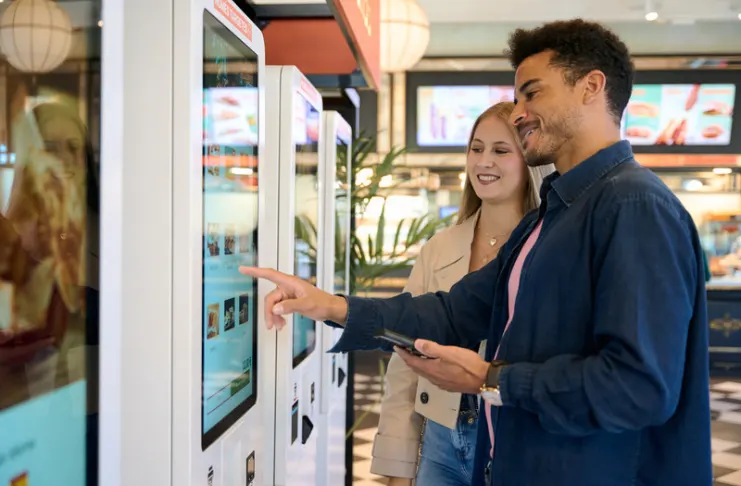

Now customers want to order the same way they make all their other purchases: from their cell phones, on their own terms. Restaurant ordering systems meet these needs and give restaurant owners faster service, fewer errors, and customer information. This guide explains how a restaurant ordering system works, how much it costs, how to implement it, and how to track the results.
What You Will Learn
- The process of an order being passed from a customer’s phone to the kitchen through the restaurant ordering system
- The systems and features to choose for your particular restaurant
- The real cost of implementing an ordering system
- Launching and promoting your ordering system
What Is Digital Ordering for Restaurants?
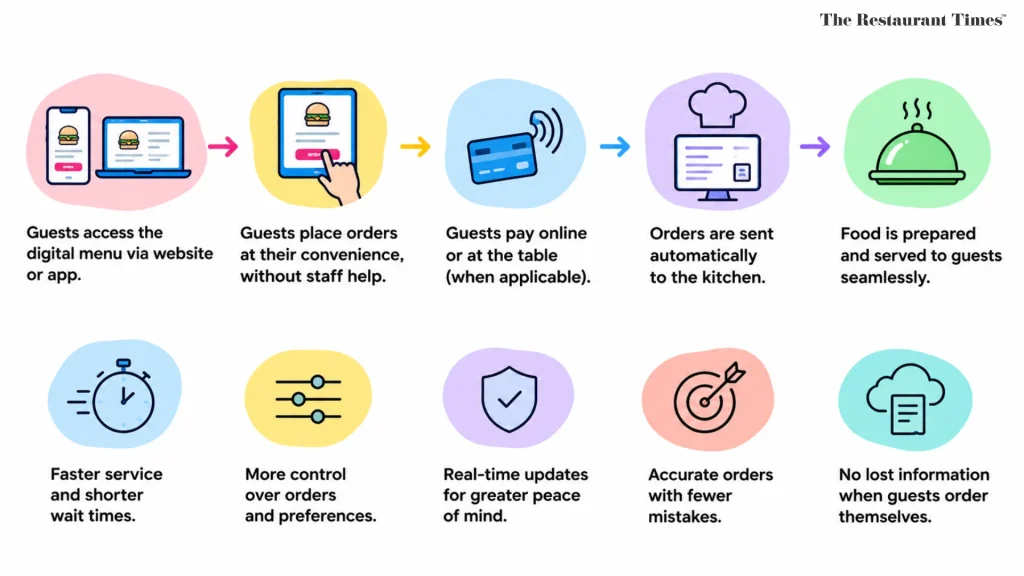
Digital ordering lets guests order and pay through a screen without necessarily needing staff assistance. This includes ordering from the company’s website, using an app, ordering from the table via QR codes, and using self-ordering kiosks inside the store. These ordering methods combine into one cohesive process that sends orders automatically to the kitchen.
Guests access the digital menu through the company’s website or app. Guests can order more easily because they don’t have to rely on a waiter; they can order at their convenience and pay later.
How Does Digital Ordering Improve the Guest Experience?
The advantages for guests include faster service, more control, and greater peace of mind. With digital order-taking software, guests can place orders online and track them. Real-time order updates increase guest satisfaction. Digital ordering reduces wait times and ensures accurate guest orders. No information is ever lost when guests place their own orders.
Read: What I Learned at the Restaurant Leadership Conference
How Does an Online Ordering System Work Behind the Scenes?
An online ordering system links four steps: the guest’s order, your POS, your kitchen, and your reporting.
How Does an Order Travel From Phone to Kitchen?
The customer makes the order through the website or app that you own. The website delivers orders directly to the restaurant’s point of sale (POS). The chefs prepare the order in the kitchen through the Kitchen Display System. Ideally, orders should be sent automatically to both POS and kitchen systems.
Why Does Automation Reduce Errors?
Order processing automation makes it impossible to make mistakes when writing down orders. Orders are sent automatically to avoid mistakes. This minimizes remakes and refunds and protects profits. Your staff does not need to enter the orders manually.
What Data Does the System Capture?
The system logs transactions and analyzes customer preferences. You can plan orders during non-peak hours and based on customer preferences for a more efficient ordering process. First-party data is accessible for marketing purposes. After some time, you will be able to understand your most loyal clients, their favorite dishes, and preferred order hours. This will help you create specials for dormant customers, sell unpopular products, and schedule labor based on demand.
What Types of Digital Ordering Systems Are There?
Most restaurants combine two or three types, depending on their service style, staffing, and guest habits.
| Type | How it works | Best for |
|---|---|---|
| Online ordering | Orders on your restaurant website | Takeaway, delivery |
| Mobile ordering | Branded app with saved orders | Repeat guests |
| QR code ordering | Scan at the table | Dine in |
| Self-order kiosk | In-store terminal | High-volume counters |
| Third-party apps | Marketplace listing | Discovery |
What Is Mobile Ordering?
Mobile ordering lets guests order and pay in a branded app, then pick up curbside or have it delivered. Optimize menus for mobile first to improve the customer experience.
How Does QR Code Ordering Work?
Guests can place orders via a QR code on a smartphone. QR code ordering lets guests browse and pay for their order using a smartphone. With table service becoming faster because no additional staff is required, another advantage of QR codes is that they are inexpensive to print, making them a quick way of implementing digital ordering even without purchasing any additional equipment.
Are Self-Order Kiosks Worth It?
Self-ordering kiosks provide faster and more accurate service. Self-ordering reduces errors and increases efficiency. Self-ordering reduces errors and simplifies billing. Self-ordering allows customers to place an order whenever it is convenient for them. Self-ordering kiosks will help to reduce the number of front-of-house staff. Customers who use self-ordering kiosks are generally happier. Order accuracy can increase by up to 30% with self-ordering systems. Hybrid staff support can enhance the customer experience by providing technical support. If a host helps first-time users, lines move faster and trust builds.
EXPERT INSIGHT
| “QR codes ‘will become the new normal well beyond COVID'” — Zach Goldstein, CEO, Thanx (Business Insider) |
What Are the Key Benefits for Different Restaurant Types?
Each format gains something different from a restaurant online ordering system, so match the tool to how you serve guests.
How Does Digital Ordering Help Dine In Service?
With self-ordering via QR codes, guests can order and pay faster, giving servers more time to be hospitable. Shake Shack equipped every restaurant in the US with self-service kiosks, reduced average service time by one minute, and shifted workers from waiting and serving to cooking and hospitality.
What Do Coffee Shops and Quick-Service Brands Gain?
Quick service is highly valued in coffee shops because most customers are returning clients who order the same drink each day. Mobile ordering saves time because customers pre-order, pre-pay, and get their coffee immediately. The introduction of Chipotle Lane pick-up lanes, along with a 207% increase in digital orders, helped Chipotle gain customers. In 2023, McDonald’s made $20 billion from digital ordering, self-ordering kiosks, and a functioning mobile app.
Does Digital Ordering Work for Small Restaurants and Multiple Locations?
Digital ordering benefits both small restaurants and chains. Small restaurants will find the simple online menu helpful, while chains will benefit from centralized menus and reporting. Sweetgreen’s first outlet reached a restaurant-level margin of 31.1% in one year through automated assembly, AI-based demand forecasting, and loyalty-program personalization.
What Does an Online Ordering System Really Cost?
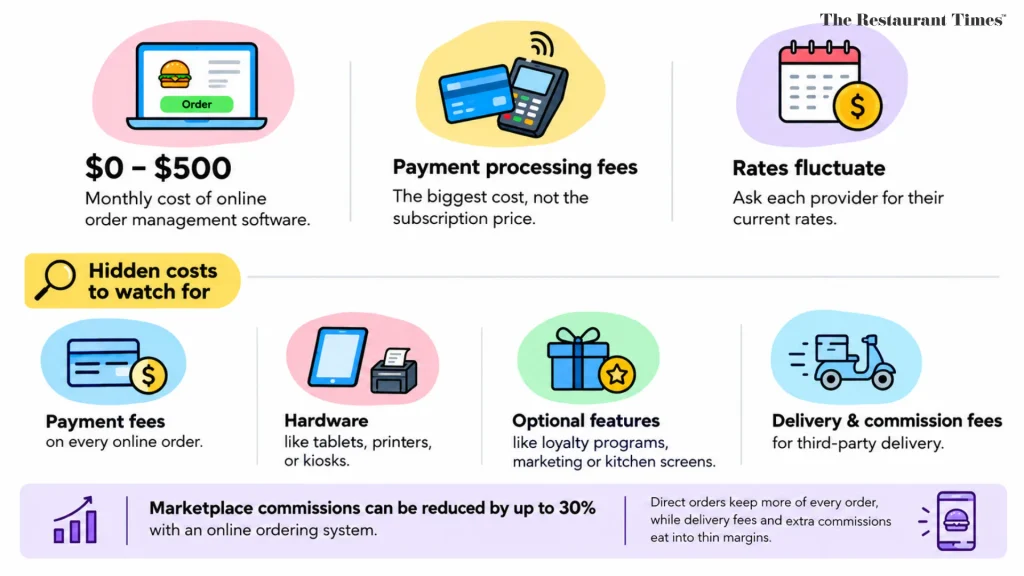
The cost of online order management software varies from $0 to $500 a month. The most critical factor is the payment processing fee, not the subscription price. Rates fluctuate, so ask each provider for their current rates. The cost of the subscription does not constitute the total cost of services.
What Hidden Costs Do Restaurant Owners Miss?
Some of the hidden costs that restaurant owners may overlook are:
- Payment fees on every online order
- Hardware like tablets, printers, or kiosks
- Optional features like loyalty programs, marketing features, or kitchen screens
- Delivery and commission fees for third-party delivery
Marketplace commissions can be reduced by up to 30% with an online ordering system. That is why most restaurant owners encourage guests to order directly. Delivery fees and extra commissions eat into thin margins, while direct orders let you keep more of every order. Even shifting a small portion of orders to your own channel can impact your monthly bottom line.
Which Features Should You Evaluate in an Online Ordering Solution?
Start with essentials, then weigh extras that match your goals and your budget.
What Is the Most Important Feature?
Menu control is perhaps the most crucial feature. You should choose flexible menus that are easy to update in a few minutes, including modifiers, scheduled orders, and item availability. Integrate online payments through Apple Pay and Google Pay, order history, and delivery management. Guests will also want to save favorites, reorder with a single click, and receive accurate pickup times. Ensure the checkout is seamless on a mobile device because most orders will originate from there. Test on slow internet connections, with various payment options, and for longer orders.
Which Marketing Features Matter?
Consider text marketing, loyalty programs, and automated marketing. Automated marketing campaigns efficiently drive repeat orders. Social channel links should also be included to widen the reach. Automated marketing campaigns, such as win-back texts, ensure a constant inflow of revenue without additional work by your employees. Ensure your marketing solutions are using your own customer information and not renting the guest list from marketplaces.
What Integrations Do You Need Beyond the POS?
Your POS system is the hub, but the best setups connect more tools into one system.
How Do You Manage Incoming Orders Across Channels?
Send incoming orders from your website, kiosks, and app through a single channel. Synchronize the menu across all channels so prices and stock stay consistent. Consider Uber Direct or hiring your own drivers for dispatch. Either way, you can retain the guest while adding delivery management to your online ordering process.
What Else Should Connect?
Google Business Profile and your current website must be integrated. Look into the integration capabilities with Toast POS or Square Online if you have them. Find out whether the connection is native or requires a connector app, and who will assist you if there are any issues. The seamless integration with your current website will help keep your branding intact.
What Does the Implementation Roadmap Look Like?
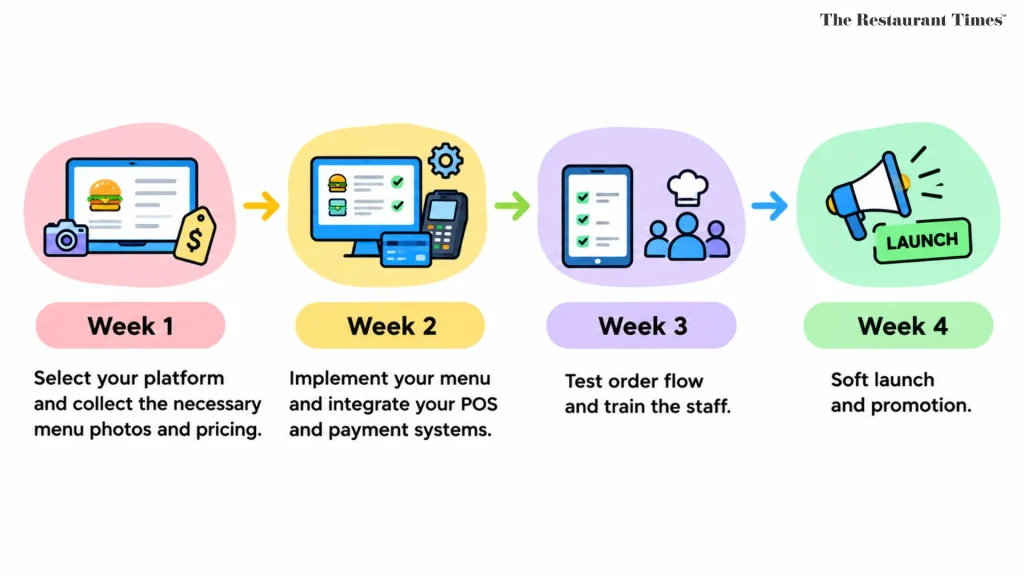
Most implementations take several weeks, depending on your menu size and number of locations.
- Week 1: Select your platform and collect the necessary menu photos and pricing.
- Week 2: Implement your menu and integrate your POS and payment systems.
- Week 3: Test order flow and train the staff.
- Week 4: Soft launch and promotion.
Plan some time within the timeline for collecting menu photos, setting taxes, and testing printers. Start with a soft launch involving your friends and frequent visitors first, and sort out the bugs before going public.
Costa Vida migrated to an online platform, reducing costs by $700,000 per year and onboarding new locations in only 48 hours. This simplified guest payments and cut transaction fees and location onboarding from weeks to 48 hours. Lesson learned: payment processing is a huge cost driver and should be reviewed annually.
How Do You Get More Customers Using Your Direct Ordering Channel?
Guests need some reason to leave these marketplaces. Customers like to order through your website more than third-party apps. Make sure your restaurant’s website is the simplest way to order. An order button, a well-functioning menu, and a simple checkout process will reduce friction. When guests have to search for the button themselves, they will end up using third-party apps, which you are trying to avoid.
How Do You Promote Direct Orders?
Put QR codes on the receipt or on tabletops. Link your direct ordering to your Google business page and social media pages. Offer something third parties can’t, like loyalty rewards or delivery service. Restaurants can increase online revenue by up to 270% with Owner.com. Online ordering systems can boost sales by 270% in three months.
How Do Loyalty Rewards Drive Repeat Orders?
Loyalty programs can increase customer retention by 87%. Restaurants using loyalty rewards see a 270% increase in online sales. Real examples:
- Mr. Pickles doubled online sales and increased first-party orders to 42% of total sales by adding 2,500+ loyalty members per month through their branded app linked to the Pickle Points Rewards program.
- Toastique saw an 87.5% increase in loyalty membership in four months by enabling online ordering as part of its branded experience and using data to re-engage lapsed guests.
- Twice Daily saw 225% sales growth and a 55% increase in monthly order size with a branded app that added loyalty capabilities and converted one-off visitors into returning guests.
- Pump N Pantry saw a 20% increase in online sales and 6,000+ loyalty members in a year by offering drive-thru and curbside pick-up options for efficient service.
- Captain D’s doubled their online orders and increased their loyalty membership by 42% using a digital platform.
- Thompson Restaurant saw a 90% revenue uplift through targeted marketing campaigns. Small marketing teams utilize loyalty data to segment their customers and personalize communication.
- Five Guys accessed the guest data through Olo’s Guest Data Platform and increased revenue.
How Do You Optimize Your Online Menu for Higher Order Values?
A well-built digital menu sells for you, even when your staff is busy elsewhere.
Customers tend to buy more when digital menus recommend add-ons. Upselling and promotion through digital menus help increase average transaction value. Instead of a fixed menu with images, add photos and pairing recommendations. Place high-profit products at the top, and offer drinks or sides at checkout, while highlighting special offers. Optimize the menu for mobile; hence, test everything from your phone. Find out what add-ons sell better each month and remove the ones that do not.
How Do You Measure Success With KPIs and Benchmarks?
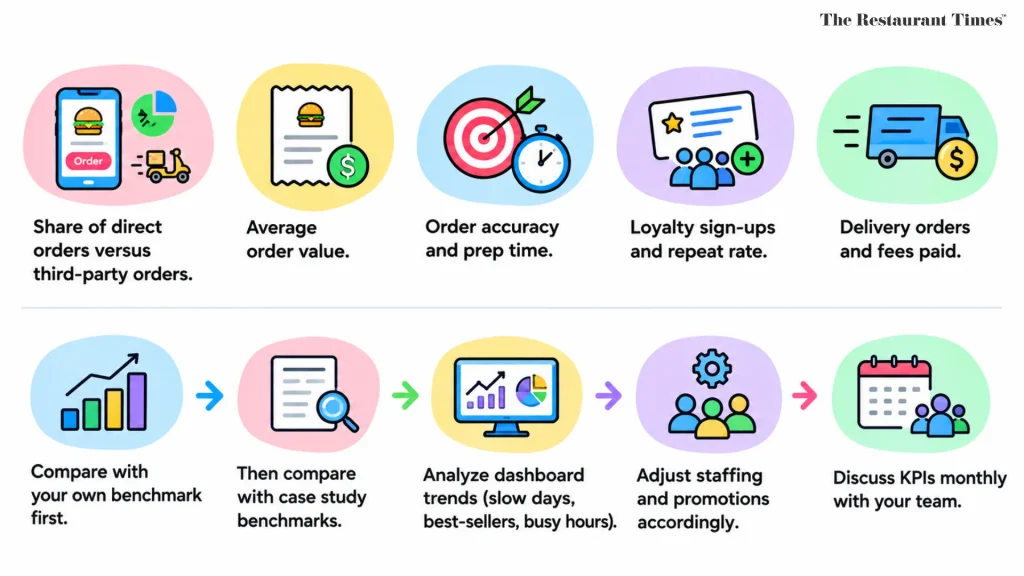
Track a few numbers weekly, so problems surface before they hurt sales:
- Share of direct orders versus third-party orders
- Average order value
- Order accuracy and prep time
- Loyalty sign-ups and repeat rate
- Delivery orders and fees paid
Compare yourself first with your own benchmark, and then with benchmarks from case studies provided above. Analyze trends in your dashboard, such as slow days, best-selling products, and busy hours, and adjust staffing and promotions accordingly. Discuss KPIs monthly with your team.
How Do You Calculate ROI and Break-Even?
Include the monthly charges, processing costs, and equipment expenses. Subtract the commission you would have earned and any additional income from larger order sizes. Determine the number of months required to recover the cost of setup using the formula above. For instance, if you order directly instead of selling through marketplaces, account for the commission charges you would avoid. Also include soft benefits such as time savings and reduced errors.
How Do You Choose the Best Online Ordering System for Your Restaurant?
The best online ordering solution matches your volume, POS, and growth expectations.
Start by selecting two or three providers. Involve your employees, since they’ll be using the service. Look at the fees for usage per month, processing, and support. Request a demo with your menu and see how it handles direct delivery orders. Read reviews from establishments similar to you in volume, find out the contract length, and learn how your customers’ data will be handled when you switch.
What Common Challenges Come Up and How Do You Fix Them?
Potential issues that can arise along with solutions:
- Adoption: Encourage direct ordering everywhere.
- Menu inconsistency: Ensure menu synchronization occurs automatically.
- Employee resistance: Educate in advance and maintain hybrid system support so no one is left behind.
- Unforeseen additional costs: Go through additional costs listed in the contract before signing.
- Slow preparation process: Use a Kitchen Display System with set preparation time limits.
Most issues come from quick implementation rather than the technology itself.
KEY TAKEAWAYS
| – Fast, accurate service, and you get your first-party data. – Fees and add-ons affect true costs much more than the subscription does. – Loyalty rewards and direct promotion make customers leave commission-based apps. – Monitor KPIs and determine break-even before and after launch. |
Frequently Asked Questions
1. How much does a digital ordering system cost for restaurants?
Most digital ordering software costs between $0 and $500 per month, depending on the platform, functionality, and restaurant size, plus transaction charges. When evaluating a digital ordering system, compare pricing packages and include integration, hardware, installation, and support costs.
2. What is the best digital ordering system for restaurants?
The best digital ordering system depends on the restaurant’s size, order volume, current POS system, and operating model. Key features of the best digital ordering system include menu updates, payment processing, kitchen integration, order tracking, and customer data management.
3. What is digital ordering for restaurants?
Digital ordering lets customers browse the menu and place orders via the website, mobile app, QR code, or self-service kiosk in the restaurant. Orders can be sent automatically to the POS system or kitchen display system (KDS).
4. How do I set up online ordering for my restaurant?
Start by choosing an online ordering portal that fits your budget and integrates with your POS software. Load your menu, customize prices and modifiers, configure payments, choose pickup or delivery settings, test your ordering process, and train your employees before launch. With proper preparation, you can get up and running with a simple system in less than a month.
5. Does digital ordering work for small restaurants?
Yes, digital ordering can work for small restaurants thanks to inexpensive subscription plans, commission-free ordering, and QR code-based ordering systems.