

We’re living through a fundamental shift in how restaurants operate. Like, go to a few restaurants out there and notice how many still use paper menus, how many people are still paying in cash, and even how many are placing orders directly with servers. Chances are you’ll come across QR code menus, tableside tablets, self-service kiosks, or even something else.
But the question is, since operators have these choices, how do they decide which ordering system is actually “right” for them?
It’s important to make this deduction because whatever tech you choose will shape your customer experience, average order value, operating costs, and staffing structure. Plus, data confirm that two-thirds of consumers have used one or more technology-enabled ordering systems while dining on-premises, and they already know about and somehow expect more of these.
So, which one should go with? Let’s help you compare QR code ordering vs. tableside tablets vs. kiosks.
What You’ll Learn
- How QR code ordering, tableside tablets, and self-service kiosks compare in terms of cost, setup, customer experience, and use cases.
- The strengths and limitations of each ordering system.
- Which solution best fits your restaurant model?
QR Code Ordering vs. Paper Menus: Which Makes More Sense Today?
Marcus Samuelsson argues, “One of the reasons that people enjoy coming to a great restaurant is that when an extraordinary meal is placed in front of them, they feel honored, respected, and even a little bit loved.” QR code ordering, in a way, if done well, delivers that feeling from the very moment customers scan the table.
As far as data is concerned:
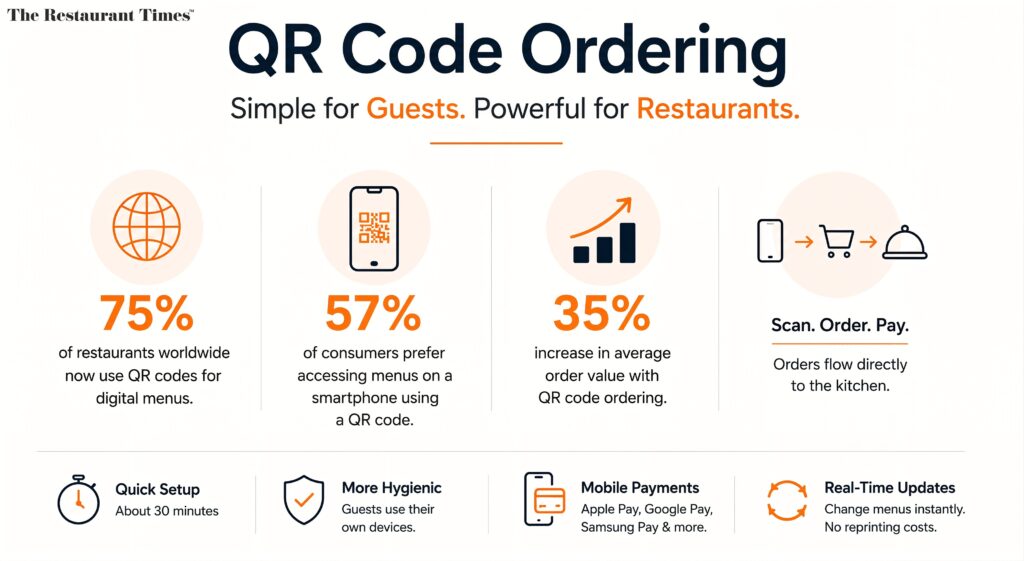
- An estimated 75% of restaurants worldwide now use QR codes for digital menus, and that number continues to climb.
- 57% of consumers said they prefer to access menus on a smartphone using a QR code in restaurants.
- Restaurants using QR code ordering report an average 35% increase in average order value, largely because digital menus consistently surface upsell opportunities that staff may otherwise miss during busy service.
See, QR code ordering allows customers to scan a QR code with their smartphone to access a digital menu, place orders, and make payments without needing to download an app. That order then flows directly to the kitchen through your restaurant POS, and chefs prepare accordingly.
The implementation of QR code ordering is quick, too, and it typically takes about 30 minutes to print QR codes, place one on every QR table, and connect them to their POS, as opposed to the longer setup required for kiosks.
There’s also the matter of hygiene concerns, which means QR code ordering is more hygienic than kiosks because it eliminates shared surfaces; customers use their own devices instead of touching a communal touchscreen, which can harbor germs. Customers use their own smartphone rather than touching a communal surface, which, btw, for a meaningful segment of guests, genuinely affects where they choose to eat.
As for the payment process, customers complete mobile payments, including Apple Pay, Google Pay, and Samsung Pay, through their own phone, with no separate credit card terminals required. For operations facing record inflation and rising printing costs, QR systems also eliminate the cost of reprinting physical menus whenever prices or items change.
QR code ordering is best for high-volume, casual dining, cafes, and bars, offering low cost and quicker service, especially during peak hours. If that’s your format, there’s a strong argument for starting here.
💡Note: Tablets and QR systems demand flawless, high-density guest Wi-Fi coverage across the entire floor. If your connectivity is inconsistent, the ordering process will likely break down. Also, some older diners are less comfortable using their own phones to order food, so for a family or fine-dining restaurant with a mixed demographic, QR ordering alone may not be suitable for everyone.
How Does a Handheld POS System Deliver Better Service?
Again, starting off with a quote, Alain Ducasse says, “Food is one part of the experience. And it has to be somewhere between 50 and 60 percent of the dining experience. But the rest counts as well: the mood, the atmosphere, the music, the feeling, the design, the harmony between what you have on the plate and what surrounds the plate.”
Believe it or not, a tableside ordering system is also part of the “atmosphere” Alain was talking about. Here, rather than relying on a guest’s own phone, the restaurant provides a dedicated handheld pos system or tablet at the table, giving the venue full control over the digital menu, the upsell structure, and the entire payment process.
How does this help?
- Tableside ordering can significantly improve the entire table service experience by allowing diners to place orders and make tableside payments, reducing wait times, and enhancing convenience.
- Implementing tableside ordering technology can lead to higher customer satisfaction as it allows for faster service and more personalized attention from staff, who can focus on hospitality rather than taking orders.
- Research indicates that when customers use tableside ordering systems, the accuracy of orders improves, leading to fewer mistakes and a better overall dining experience.
- Tableside ordering systems can significantly improve order accuracy, as customers place their own orders or servers use handheld devices that “guide” them through the ordering process.
- The use of tableside ordering can lead to increased revenue through features that encourage upselling, as well as faster table turnover due to more efficient service.
- Implementing tableside ordering can help restaurants serve more guests with fewer staff, which is particularly beneficial during labor shortages.
Focus on the last point, really. The system’s payment capabilities also reduce checkout delays because guests can complete the bill without leaving the table. When a server carries a portable pos system and processes tableside payments at the table (including mobile POS payment via a handheld device), they handle more tables in the same shift.
Tableside tablets provide a high-quality user interface for browsing and direct tablet-to-kitchen integration. With a restaurant-provided handheld pos system, every guest sees the same high-resolution digital menu, the same pop-up prompts, the same upsell flow.
Moreover, high-quality imagery and prompts can significantly boost online sales. Research shows that 94.1% of people say product visuals influence their buying decisions, and 67% rank image quality higher than product descriptions or reviews. Poor images drive customers away, while clear, professional visuals build trust and improve conversions.
Consumers also spend an incredible 20% more when ordering through technology like tableside ordering and online menus, which directly boosts revenue.
💡Note: Using tablets at tables requires maintenance, including cleaning and charging, plus tablets and QR systems demand flawless, high-density guest Wi-Fi coverage across the entire floor, so infrastructure investment is still required regardless.
How Do Self-Service Kiosks Improve Order Accuracy?
“If you have a good experience in a restaurant, you tell 2 people. If you have a bad experience, you tell 10 people,” Anthony Bourdain said. Kiosks have a really big potential to reliably create good experiences at scale.
Self-ordering kiosks are standalone touchscreen terminals that allow customers to browse the menu, customize their order, and pay without interacting with staff, streamlining the ordering process. This model works particularly well because customers control the entire service process, from menu browsing to payment.
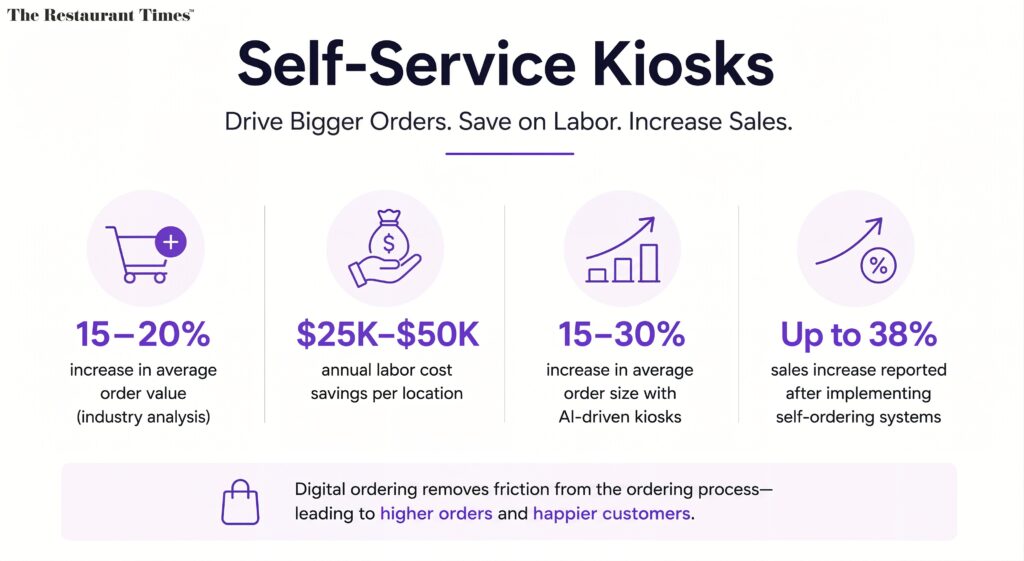
They’re the format that McDonald’s, Taco Bell, and other major quick-service restaurants built their ordering infrastructure around. Self-service kiosks increase average order value by 15-20% according to industry analysis, with annual labor cost savings of $25,000-$50,000 per location. AI-driven restaurant kiosks deliver 15-30% increases in average order size. Some restaurants report sales increases of up to 38% after implementing a self-ordering system, largely because digital ordering removes friction from the ordering process.
Kiosks typically use 15–22-inch touchscreens and require a dedicated internet connection, a payment terminal that supports cards and every major digital wallet, and sometimes a receipt printer, making them purpose-built for restaurant environments.
💡Note: Using kiosks can make the dining experience feel highly technical and can lead to a transactional feeling, for a fine dining restaurant or a warm family restaurant, that might not look like a very appropriate investment.
QR Code Ordering vs. Tableside Tablets vs. Kiosks: How Do They Actually Compare?
Digital self-service solutions differ significantly in hardware ownership, cost, and guest experience. While QR code ordering relies on customers’ smartphones, tableside tablets use restaurant-owned devices, and self-service kiosks require dedicated hardware. Each comes with its own strengths, trade-offs, and ideal use cases. Here’s how the three compare across the factors that matter most.
| Factor | QR Code Ordering | Tableside Tablets | Self-Service Kiosks |
| Setup cost | Low | Medium | High |
| Setup time | 30 minutes | Days | 2-6 weeks |
| AOV increase | ~35% | ~20% | 15-30% |
| Hygiene | High (own smartphone) | Medium | Lower (shared touchscreen) |
| Control over UX | Low | High | High |
| Best format | Casual, cafe, bar | Full-service, fine dining | QSR, fast-casual |
| Maintenance | Minimal | Charging, cleaning | Hardware, software |
| Staff impact | Reduces order-taking | Free up servers for hospitality | Reduces counter staff |
How Will Each Option Impact Your Operating Costs & Customer Experience?
Amid record inflation, the conversation about operating costs has sharpened considerably. Restaurants are now paying more for labor, spending more to maintain service standards, and still, you can’t run from the fact that customers expect seamless, fast service even when restaurants are running with fewer employees.
Digital ordering helps address this challenge. QR ordering, for example, handles the ordering process digitally, allowing staff to focus on hospitality, food delivery, and guest interaction, so you can still offer better service even with the same headcount. Kiosks in quick-service restaurants eliminate counter staff entirely from the ordering function, redirecting labor to food preparation and delivery integrations. Tableside tablets with a handheld POS system allow servers to manage more tables simultaneously, rather than walking back and forth to the POS systems at a central point.
INDUSTRY INSIGHT
| QR code ordering systems have become essential in the restaurant industry, with 75% of U.S. operators viewing contactless ordering as crucial to daily operations post-pandemic. And you know the operators seeing the strongest results across all three formats have one thing in common: they matched the technology to their service model before investing in any of them. Moreover, QR code ordering can enhance customer satisfaction as it allows diners to order from their table without waiting for a server, thus improving the overall dining experience. Tableside ordering is a technology-driven solution that allows customers to order and pay for their food and drinks directly at their table, improving efficiency and reducing wait times. And kiosks have proven their value in high-volume environments where speed and self-service are what customers expect. The worst decision you can make at this point is not choosing any system at all and watching your competitors build brand loyalty and repeat visits on the back of a seamless ordering and payment process while you’re still relying on traditional ordering, paper menus, handwritten orders, and the printing costs that come with them. |
How Can You Choose the Right POS Systems/Ordering Systems for Your Restaurant?
For most casual dining restaurants and cafes, you should start with QR ordering. Its implementation is fast, operating costs are low, the payment process is smooth, and consumer adoption is already in place. You can build delivery integrations, inventory tracking, and online ordering into the same pos software ecosystem as you scale.
For full-service and fine-dining restaurant operations, we’d suggest you invest in a tableside ordering system. The handheld POS system gives your team mobility because tableside payments mean guests never have to wait for the check. For many diners, that combination of speed and personal interaction strikes just the right balance.
This way, the system’s seamless integration with your restaurant POS supports more efficient operations across the entire service without sacrificing the hospitality that defines your brand.
For high-volume quick-service restaurants, self-service kiosks deliver the best ROI. The increase in average order value, the reduction in order errors, and the reallocation of labor to food preparation all compound quickly at scale. The higher average order values and lower error rates often mean the benefits justify the higher upfront investment.
Now, again, which one of these three should you choose? Maybe use a combination of all three, unified under a single restaurant POS with automatic batch reports, delivery integrations, and inventory tracking in one place.
The technology definitely supports it, but the question is whether your operation is ready to use it properly. Because –
“Although the skills aren’t hard to learn, finding the happiness and finding the satisfaction and fulfillment in continuously serving somebody else something good to eat, is what makes a really good restaurant,” Mario Batali said. The right ordering system, in this sense, creates the space for your team to deliver the exact.
KEY TAKEAWAYS
| – Self-service ordering kiosks have become mainstream in fast food chains globally, with major brands like McDonald’s and Taco Bell leading the way in their adoption. – Kiosks can significantly reduce order errors since customers input their own orders directly into the system, minimizing misunderstandings with kitchen staff. – Kiosk implementation can take 2 to 6 weeks due to the need for hardware procurement, installation, and staff training, whereas QR ordering can be set up in about 30 minutes by simply generating and placing QR codes. – Kiosk implementation can take 2 to 6 weeks due to the need for hardware procurement, installation, and staff training, whereas QR ordering can be set up in about 30 minutes by simply generating and placing QR codes. – Kiosks are best suited for quick-service restaurants (QSRs), where they help reduce long, in-person lines and streamline high-volume orders. – The implementation of self-ordering kiosks can take 2–6 weeks, as it involves hardware procurement, software installation, and staff training, making it a more complex project compared to QR code ordering. – Self-ordering technology increases average check sizes by 10% to 30% through automated prompts. Increased sales can be achieved by allowing customers to customize orders and add items through digital ordering methods. – QR code ordering is more hygienic than traditional methods, as it eliminates the need for shared touchscreens, allowing customers to use their own devices instead. |
Frequently Asked Questions
1. Which is the best QR ordering system?
Honestly, we can’t name any one QR ordering system as the “best” because one system may work for X restaurant and may not deliver the same ROI for Y. The right choice will always depend on your restaurant’s size, service style, budget, and POS integration requirements. So, when looking for any software, choose a solution that is easy to use, reliable, and compatible with your existing tech stack, along with offering other core features.
2. What features should a QR code ordering system have?
A good QR ordering system should offer digital menus, online ordering, contactless payments, POS integration, real-time menu updates, inventory syncing, upselling tools, and sales reporting. Plus, it should be intuitive.
3. How much does a QR code ordering system cost?
The exact costs vary depending on the provider and features. Some platforms offer basic QR ordering for a monthly subscription, while others charge setup fees or transaction-based pricing. If a particular software offers some advanced integrations and custom features, you might need to pay an even higher cost.
4. Are tableside tablets more expensive than QR codes?
Yes, because tableside tablets require you to purchase hardware, charging stations, and pay for ongoing device maintenance, so it’s naturally more expensive than QR code ordering, which relies on customers’ own smartphones.
5. How many kiosks does a restaurant need?
Well, there’s no fixed number for that. It depends on your restaurant’s size, customer volume, and layout. High-volume quick-service restaurants often install multiple kiosks to reduce queues during peak hours, while smaller operations may only need one or two.